

 Here it is










CompanyCam
Monthly bill
- Crew plan$149
- 17 more people × $34$578
Total$727/mo
Billed yearly: $612/mo
Every person who takes photos needs a seat. No crew scheduling or time clock on any plan.
In the order the work happens on a site
CompanyCam pricing and alternatives · Updated
CompanyCam charges $34 a month for each person who takes photos, after the first three. Parli files every photo to its job too, and the whole crew signs in free. The schedule, the time clock and video calls come with it.
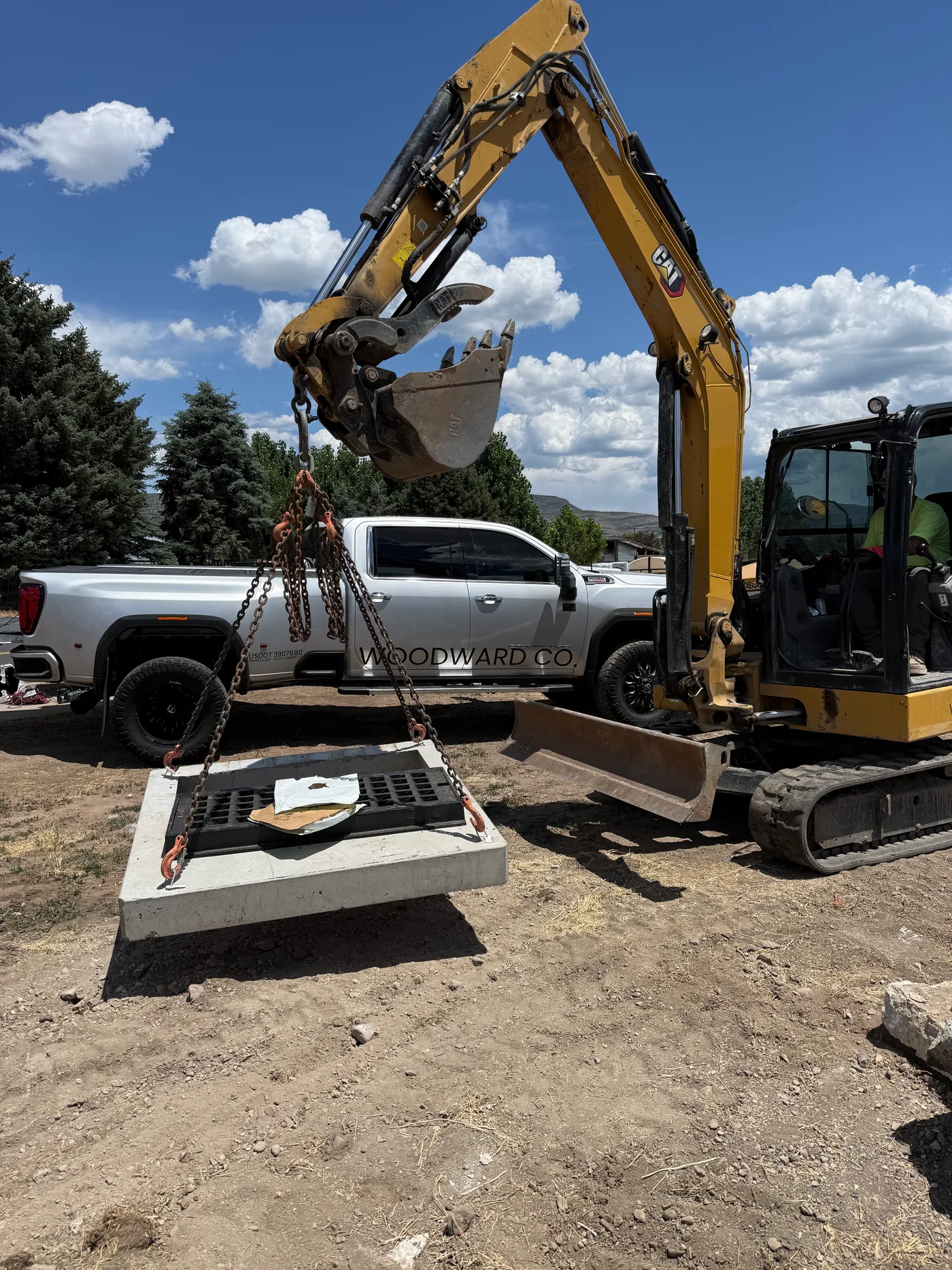
Their price list
CompanyCam publishes its prices. Every plan is priced by the user, and anyone who takes photos is a user.
| Plan | Billed monthly | Billed yearly | Users included | Each extra user | Made for |
|---|---|---|---|---|---|
| Core | $79/mo | $63/mo | 1 (2 at most) | $34/mo ($29 yearly) | Solo and small teams |
| Crew | $149/mo | $119/mo | 3 | $34/mo ($29 yearly) | Growing teams |
| Scale | $299/mo | $249/mo | 3 | $34/mo ($29 yearly) | Multi-crew operations |
| Enterprise | Quote | Quote | 50+ | Quote | Multi-location companies |
Your crew
On CompanyCam, everyone who takes photos is a paid user. On Parli, you pay for the office, and the field is free. Count your people and both bills update.
CompanyCam
Monthly bill
Total$727/mo
Billed yearly: $612/mo
Every person who takes photos needs a seat. No crew scheduling or time clock on any plan.
Monthly bill
Total$49/mo
Billed yearly: $40.83/mo
The schedule, the time clock, video calls and the assistant are included.
Same 20 people: Parli costs $678 less a month. That's $8,136 saved every year.
CompanyCam prices are from companycam.com/pricing on October 18, 2026, in US dollars, with every person counted as a user. Their Core plan holds two users at most, so three or more is priced on Crew; 50 or more get a quote. Core leaves out AI, and Scale ($299 a month) adds unlimited templates and reports.
Jobsite photos in Parli
Real screens from Parli, on real jobs. Tap one to see it full size.
Snap it. It's already filedParli knows which job you're standing on.
Ask for the shotThe crew sees the list on their camera.
Point out the problemDraw an arrow, write a note.
Same spot. See the changeSlide between the before and the after.
One link. No app neededPhotos added later show up on the same link.
Tap, Take it, DoneThe photo files itself and goes back to whoever asked.
Snap it mid-callA full-quality photo, filed to the job's photos.
Feature by feature
On taking the photos, the two are close. Everything after the photo is where Parli keeps going and CompanyCam stops.
| Feature | CompanyCam | |
|---|---|---|
| Taking the photos Both do · 11 | ||
| Photos and video, filed by jobWith the time, the place and who took it. | ||
| Draw on a photoArrows, circles and notes to point out the problem. | ||
| Before and afterThe same spot, then and now. | ||
| TagsFind the shot later by what is in it. | ||
| Comments on a photoA note on the shot, and the right person is told. | ||
| A live link for the clientNew photos show up on the same link. | ||
| Works with no signalShots save on the phone and upload later. | ||
| Daily logs and photo reportsThe day on record, with the photos in it. | ||
| Checklists and tasksAssigned to a person and checked off from the phone. | ||
| AI that writes up the dayA draft from what the crew did and shot. | ||
| iPhone and Android appsAnd the office in a browser. | ||
| Everything after the photo Only in Parli · 15 | ||
| Crew schedulingThe week's people and machines on one board. Each person is sent only what changed. | ||
| Gantt chartLink the tasks; drag one and the rest follow. | ||
| CalendarEvery job and task by day, week or month. | ||
| Time clockOne tap at the job, even with no signal. | ||
| Clock in the whole crewThe foreman checks off who showed up. | ||
| Shop tablet time clockOne tablet on the wall, a PIN for each person. | ||
| Video calls from the jobBack camera ready, tap to point, snap a photo to the job mid-call. | ||
| An assistant that knows the scheduleAsk who's free Thursday or what's behind, or say a task and it writes it. | ||
| Machines booked on the schedulePut a machine on a task and nobody else can take it those days. | ||
| Machine service, next to the jobService due shows beside the job it's on. | ||
| Out-sick cover in a tapMark someone out and see who can step in. | ||
| Job costsBudget, spent and what's left on each job. | ||
| Subcontractor schedulingSubs get the dates by email and confirm with one tap. | ||
| Crew logins freeEveryone in the field signs in and takes photos free, on every paid plan. | ||
| A free planOne job, no card, for as long as you like. | ||
Checked against CompanyCam's pricing page, plan comparison table and feature pages on October 18, 2026. Something changed? Email joey@parli.io and we'll fix it.
After the photo
CompanyCam's plans list no crew schedule, calendar, time clock or equipment, so the rest of the day goes in other apps. In Parli it's the same app the crew already has open.
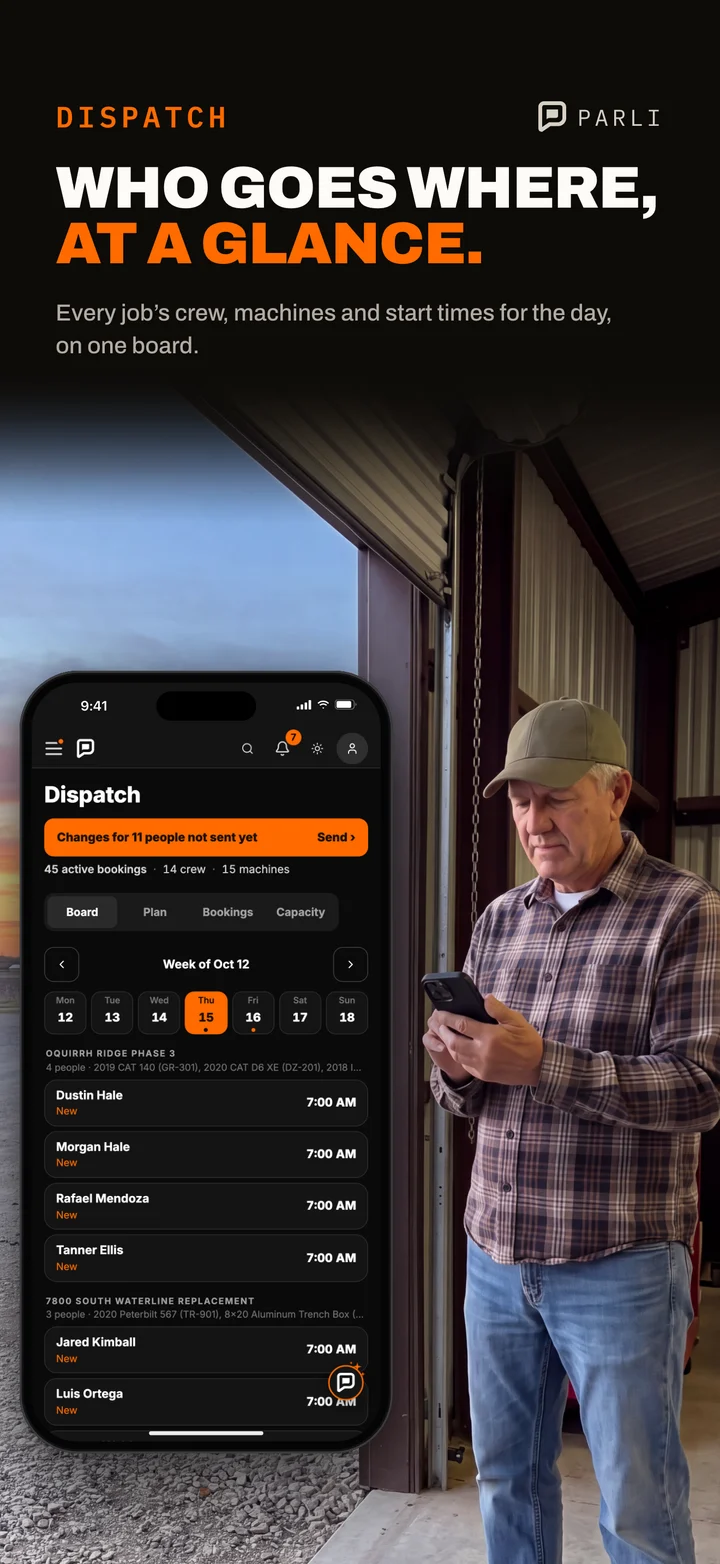 Tomorrow, on one board Every job, its crew, its machines and the start times.
 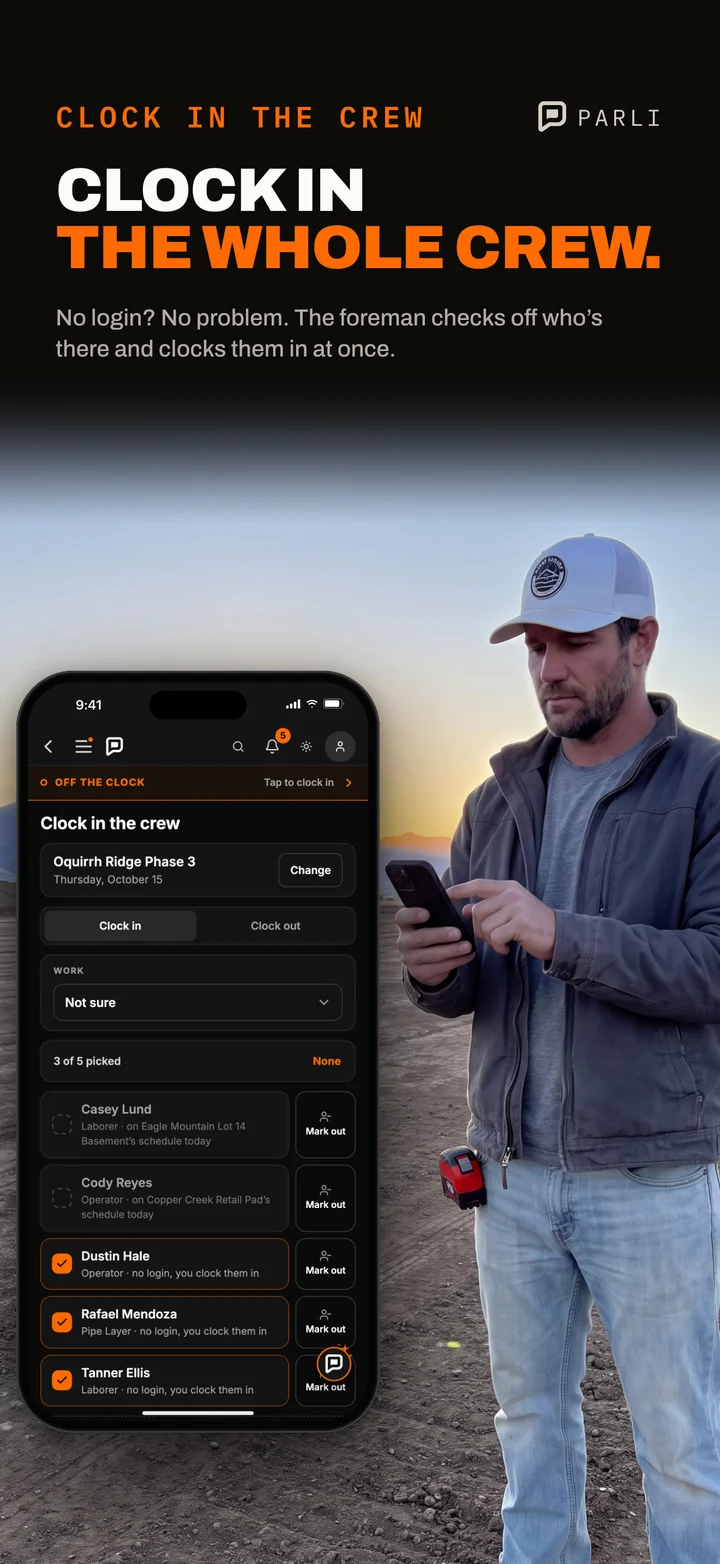 The hours, from the job The foreman clocks in the crew; the office approves the week.
 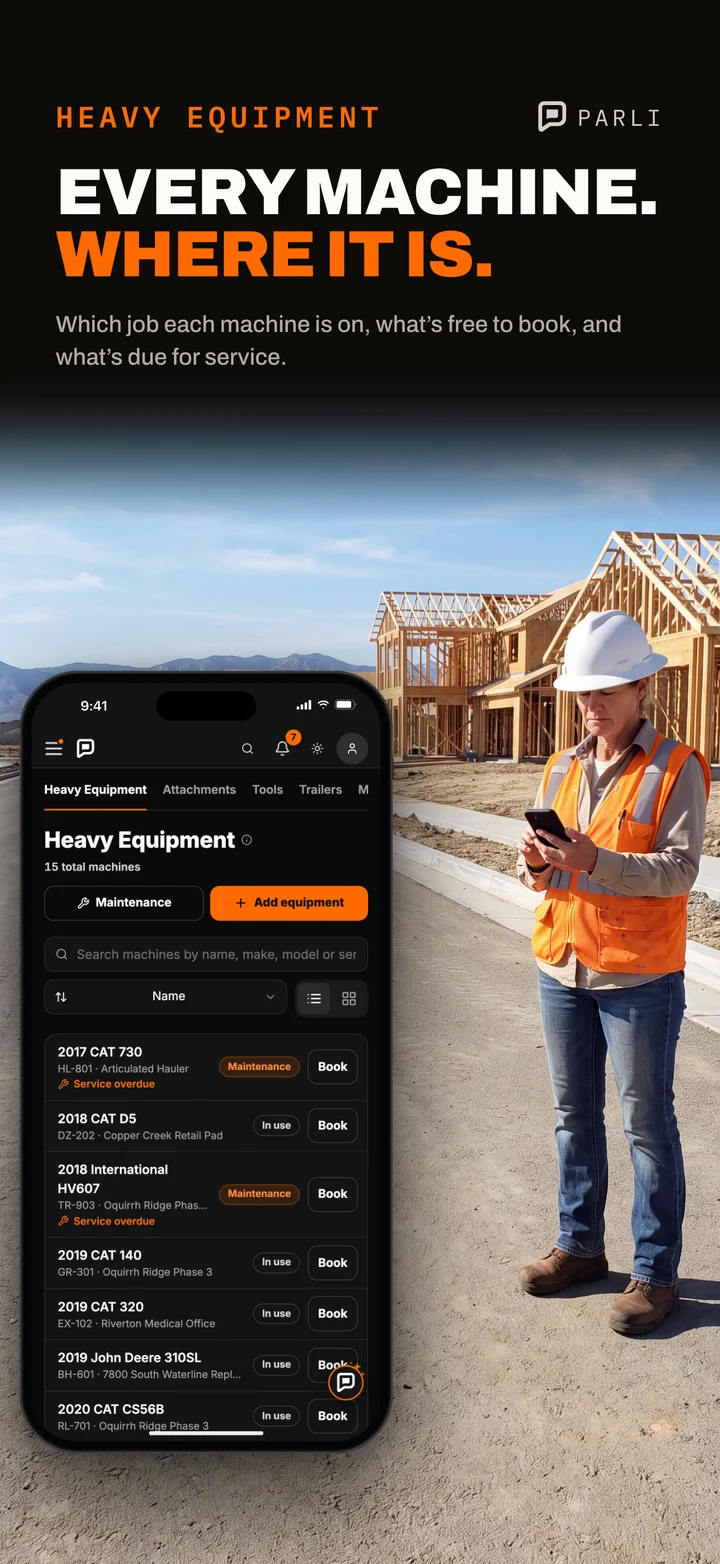 The machines, booked Where each one is, what is free, and what is due for service.
  Ask what is behind The assistant knows the schedule, the crew and the machines.
 Which one you want
CompanyCam is a very good photo app. If photos are the whole job, it may be all you need.
Questions
Billed monthly, CompanyCam is $79 a month for Core (one user, two at most), $149 for Crew and $299 for Scale (three users each), plus $34 a month for every user after that. Billed yearly it's $63, $119 and $249, plus $29 per extra user. Teams of 50 or more get a quote. Those are their published prices on October 18, 2026.
No. CompanyCam has a free trial, then a paid plan: Core is $79 a month billed monthly for one user (two at most), and the plans for three or more users start at $149. Parli has a free plan with no time limit.
Yes. Parli's Free plan has jobsite photos, tasks and daily field reports with photos for one job, one person in the office and one in the field, with no card and no time limit. When the crew grows, paid plans start at $49 a month, and every crew login is free.
Yes. Its pricing page says a seat is one person with their own login, and anyone who needs to capture photos gets a seat. On Parli you pay for office seats; everyone in the field signs in and takes photos free.
Two people in the office and eighteen in the field, on up to five jobs at once, is $49 a month on Small Business+. The same twenty people on CompanyCam Crew is $727 a month billed monthly. And Parli's price includes the schedule, the time clock and video calls.
For dirt work, yes. Photos and video file themselves to the job with the time, the place and who took it. You can draw on them, line up a before and after, tag them, comment on them and send the client a live link, with or without signal. What Parli doesn't do: LiDAR measuring, a logo watermark, payments and invoices, or review requests.
For the schedule and the hours, usually. CompanyCam's plans list no crew scheduling, calendar or time clock, and its integrations page connects it to separate job management apps. Parli is the photos, the schedule, the time clock and the crew's messages in one app.
Yes. CompanyCam's pricing page says you can export your photos before your access ends. Upload them to the job in Parli and they sit with the rest of its photos.
Start free on a real job and take the first photos today. When you move up, every crew login is free. No card to start.
Sources, checked October 18, 2026. CompanyCam's pricing page (companycam.com/pricing): Core $79, Crew $149 and Scale $299 a month billed monthly ($63, $119 and $249 billed yearly), $34 per additional user ($29 yearly), Enterprise for 50+ users by quote; its FAQ's definition of a seat, offline capture and photo export; and its plan comparison table (photos, video, before and afters, annotations, tags, project map, timelines, offline mode, reports, daily logs, checklists, signatures, comments, guest access, translations, portfolio site, payments, invoices, price book, proposals, AI and the Marketing Suite). Its Features, Advanced Features, In-App Communication and AI Features pages, and its integrations page, which connects it to separate job management apps. None of these lists crew scheduling, a calendar, a time clock, equipment, calls or job costing. Parli's prices are per company, per month, in US dollars, from Parli's own price list.